
Heyyy. So excited!!! In this post we’re going to give a first sketch of Kubernetes (K8s 🐳 to friends).
Let’s jump straight into it!
Basically K8s is a container orchestrator: a system that decides where and how your applications run inside a cluster of machines, so you don’t have to do it by hand one by one.
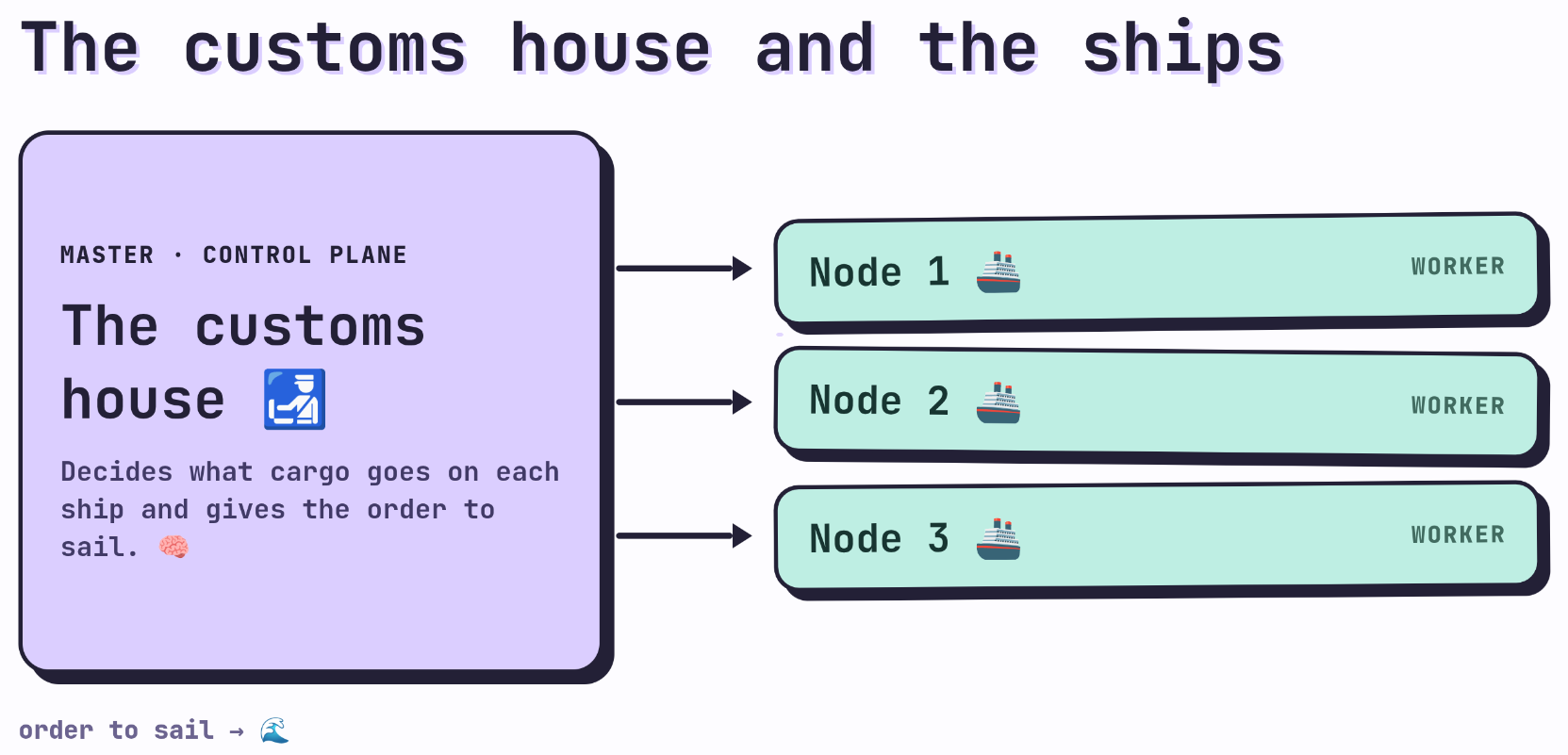
Very roughly, a K8s cluster is made up of two pieces: the master 🧠 (or control plane) and the nodes 🚢. For the diagrams in this series I’ll use only 3 nodes, let’s keep things simple.
Since I really love the sea 🌊, I’m going to make a ton of sea analogies.
Now I want you to think of the master as customs 🛃 and the nodes as ships: customs decides what cargo goes on each ship and gives the order to set sail. That’s our first level of abstraction, we’ll go down a level from here soon.
The master (the brain) 🧠
The first time I studied K8s, I thought of the master as a single component monolith, but it really isn’t! The master isn’t one single thing, it’s a group of components that work together. So let’s break them down one by one.
API server 🚪
Probably the most important component, and the one you’ll have the most contact with while working with K8s (unless you dig deeper into the control plane).
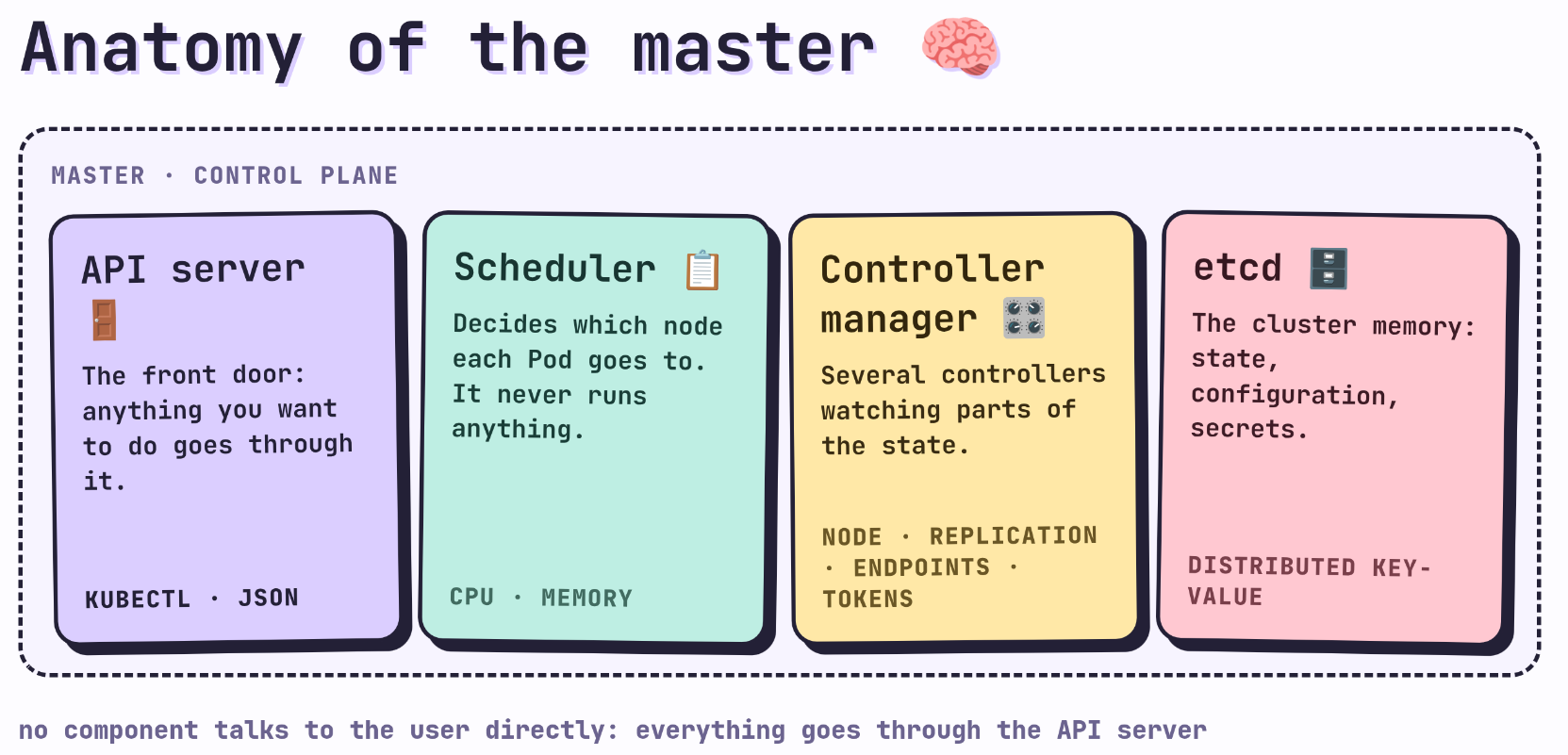
The API server is the front door: everything you want to do in the cluster goes through it, whether you’re sending requests in JSON format directly, or using kubectl, the command line tool you’ll actually interact with day to day. (Don’t ask me how it’s pronounced, K8s already gets read a thousand different ways, call it whatever you like, while studying, watching videos on YouTube and TikTok. Everyone pronounces it differently.)
No other component of the master talks directly to the user: they all go through the API server, including kubectl itself.
Scheduler 📋
The scheduler decides which node each Pod goes to (we haven’t talked about Pods in detail yet, for now think of it as “a container or group of containers”; later we’ll see the difference precisely).
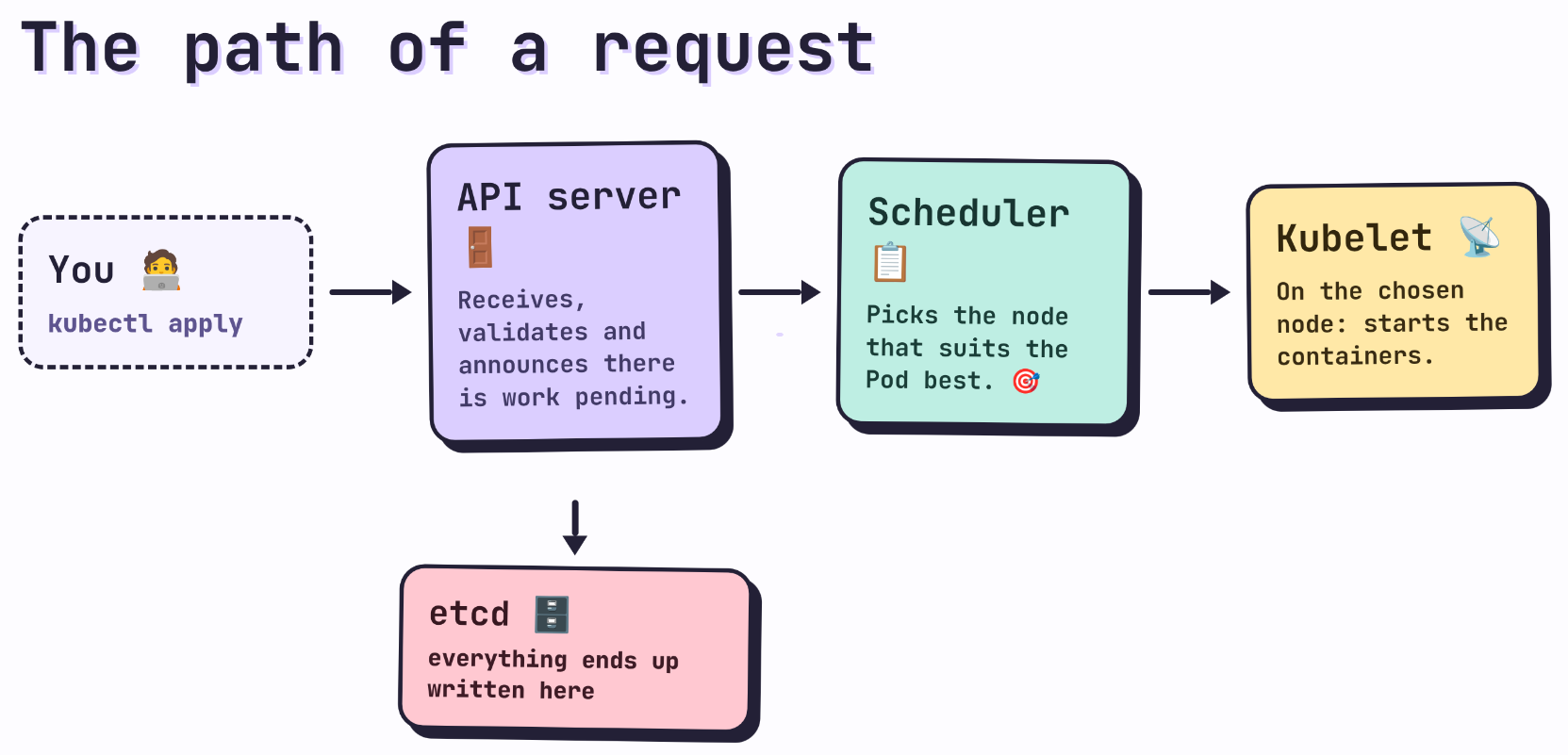
When you ask to create something, the request first reaches the API server, and it’s the one that tells the scheduler there’s pending work. The scheduler looks at the available resources (CPU, memory, constraints you’ve defined) on each node and picks the one that best fits that job. The scheduler never runs anything directly, it only decides and assigns. 🎯
Controller manager 🎛️
This box groups together several controllers, each one watching a different part of the cluster’s state. The most relevant ones to start with:
- Node controller 🛰️: watches the state of the nodes. If one stops responding, it’s the one that detects the failure and updates its status.
- Replication controller 🔁: makes sure the number of replicas you asked for (for example, “I want 3 copies of this Pod always running”) is kept; if one dies, it asks for another one to be brought up.
- Endpoints controller 🔌: connects Services with the Pods that should receive their traffic, keeping that list updated as Pods appear or disappear.
- Service Account & Token controllers 🔑: manage service accounts and the authentication tokens that processes inside the cluster use to talk to the API server.
The idea behind all of them is the same: they compare the desired state (what you asked for) against the current state of the cluster, and if there’s a difference, they act to fix it. This “reconciliation” ♻️ pattern is the philosophical heart of K8s, and you’ll see it repeat everywhere.
etcd 🗄️
It’s the cluster’s database. Everything that exists or ever existed in K8s (the desired state, the observed state, configuration, secrets) gets stored here. It’s a distributed key value store, and it’s probably the single most critical component of the whole master: if etcd goes down or gets corrupted, the cluster loses its memory. ⚠️
The nodes 🚢
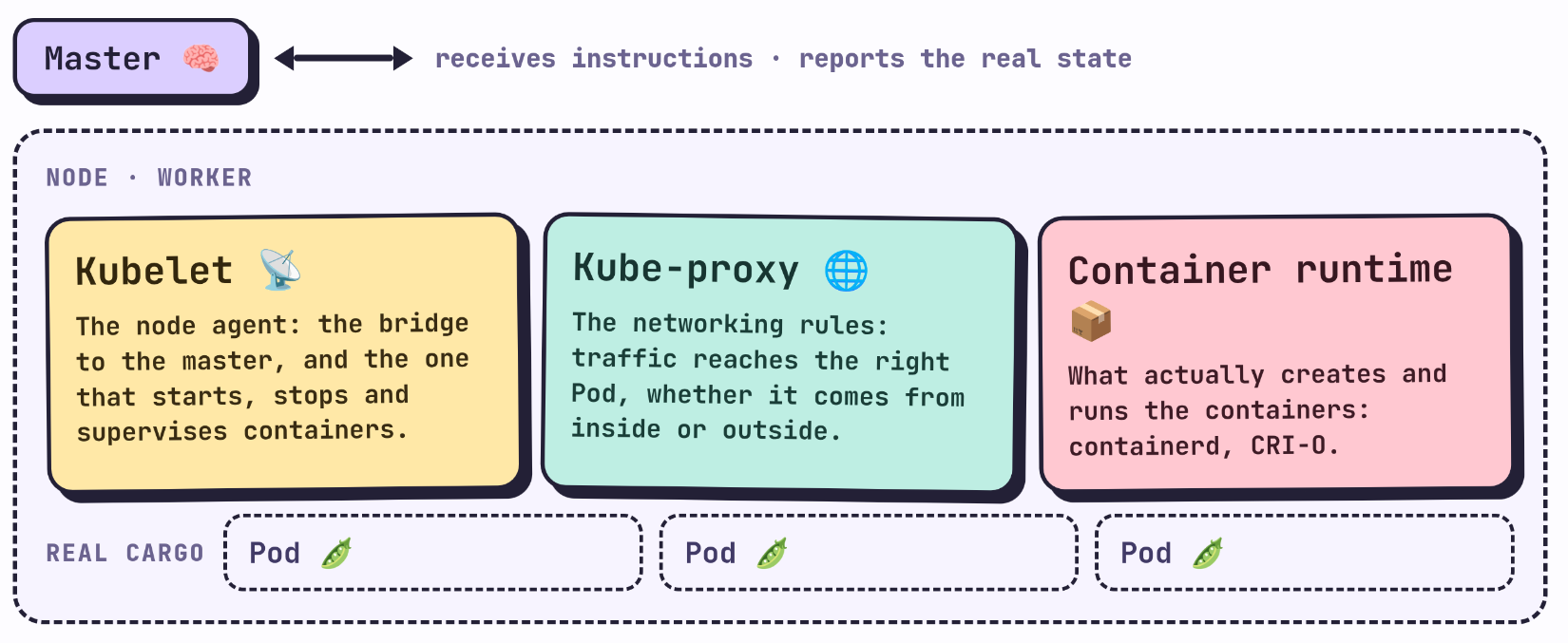
We already saw the master, let’s move on to the ships!!! Each node runs three pieces (super important for understanding how things really work):
Kubelet 📡
It’s the agent that lives on each node and acts as a bridge to the master: it receives instructions (which Pods should run there) and reports back the real state of those Pods. It’s also the one that actually starts, stops and supervises the containers on that node, relying on the container runtime.
Kube-proxy 🌐
It handles the networking side: it keeps the rules that let traffic reach the right Pod, whether it comes from another Pod inside the cluster or from outside. It’s what makes a Service (a stable IP and name) always find the real Pods behind it, even as they keep changing address.
Container runtime 📦
It’s the software that actually creates and runs the containers (containerd or CRI-O are the most common ones today). The kubelet tells it what to run, and the container runtime is the one that knows how to do it at a low level.
Pods vs. containers 🫛
Now let’s talk about the smallest unit in K8s: the Pod. In Kubernetes you never deploy a lone container, you always deploy a Pod.
I’ll talk more later in another post about what a Pod really is, because I think it deserves it.
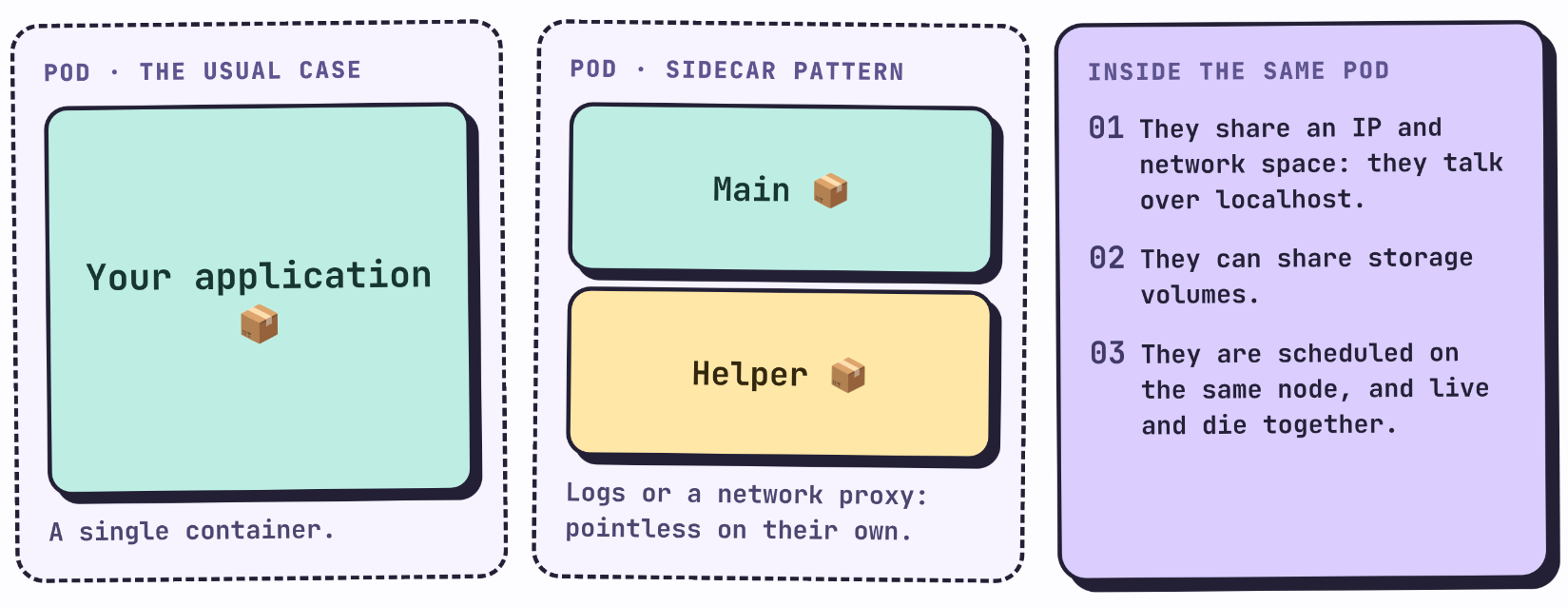
A Pod can contain one or more containers, but all the containers inside the same Pod:
- share the same IP address and the same network space (they can talk to each other over
localhost), - can share storage volumes,
- always get scheduled together on the same node, and live and die together.
The normal case is a Pod with a single container (your application). When it has more than one, it’s usually a sidecar type pattern: a main container plus another one that supports it (for example, one that collects logs or acts as a network proxy), where that second container doesn’t really make sense running on its own.
With this we now have the full map 🗺️: customs (the master) decides what’s needed and where it goes, and the ships (the nodes) run and carry the real cargo (the Pods).
End of the first post! Hope you liked it, as we keep moving forward I’ll go deeper into K8s, for now we’re literally standing at the shore of this ocean.
The song of the post
I LOVE THIS ALBUM, more than a song let’s talk about how incredible this album is. It’s a fusion of rap, hip-hop and jazz, I’d like to explain everything it involves, but I think it’s better if you listen to it yourself, it’s just like K8s, a mix of components. Hope you like it.
Jazzmatazz, Vol. 1 · Guru