
Let’s start by talking about Jorge Drexler, maybe one of the greatest singer-songwriters of our time, one of the most influential in Spanish language music worldwide today, and he happens to have a song that fits today’s topic really well because of one line: 🎶
Ir y venir, seguir y guiar, dar y tener, entrar y salir de fase.
That line is a small sketch of what’s coming now, we will no longer control our pods on our own, we will turn to “something” that will control them and manage them. We’ll understand this in more detail in this chapter and the following ones.
Today we’ll talk about ReplicaSets.
In the previous post, if we remember the previous post we ended with the problem of orphan Pods. Now the pods will no longer stay orphans, or that’s what we want 🛟
What exactly is a ReplicaSet? 🐑🐑🐑
It’s an object separate from the Pod, but one level above. And why above, we might ask? Because its job is to make sure there are always as many replicas of a Pod as we ask for. It’s watching at all times, if we ask for 3, it makes sure there are 3. Not 2, not 4. Pretty easy and simple.
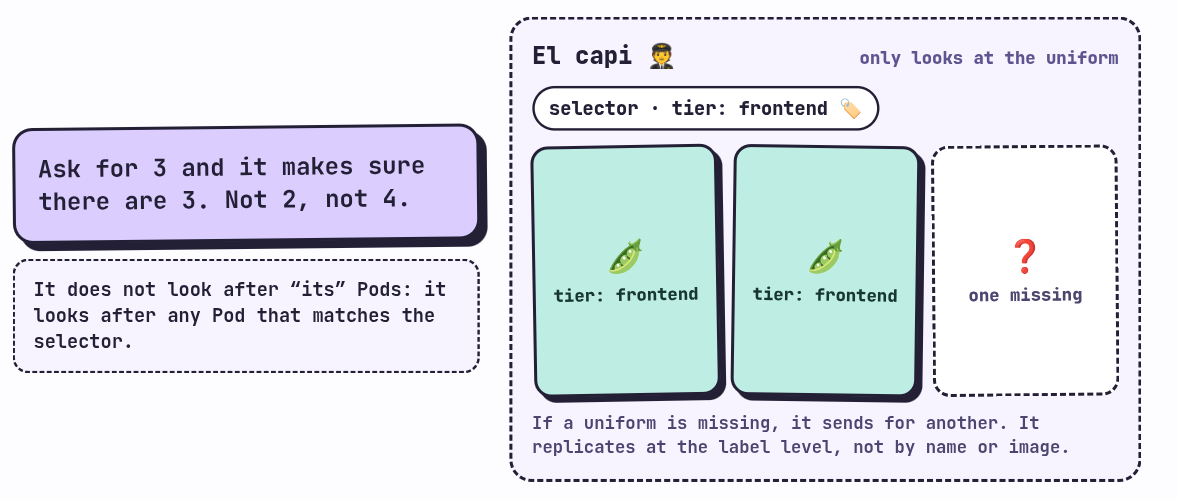
But careful, let’s understand this definition carefully, because here is the detail that confuses people the most at the beginning. The ReplicaSet doesn’t take care of “its” Pods, it takes care of any Pod that matches a selector -> Label. That selector -> label is defined with matchLabels, and it’s literally the only way it has of knowing which Pods are its responsibility.
So the ReplicaSet replicates at the label level, not at the level of name or image or anything else. That’s why the labels we saw in the previous post were so important 🏷️
If we make a quick analogy, we can think of it as a captain counting the crew on board. He doesn’t care who each one is, he just looks at who is wearing the uniform (the label), and if one is missing, he sends for another. And if someone climbs aboard the ship wearing the uniform, he counts them as his own, whether they like it or not. We’ll see that last part in a while, and it doesn’t turn out so pretty 😬
Our first ReplicaSet 📜
All the files for this post are in the course’s GitHub repository, inside the rs folder. If you prefer downloading them instead of copying and pasting, they’re there.
This is firstRs.yaml:
apiVersion: apps/v1
kind: ReplicaSet
metadata:
  name: frontend
  labels:
    app: guestbook
    tier: frontend
spec:
  # modify replicas according to your case
  replicas: 3
  selector:
    matchLabels:
      tier: frontend
  template:
    metadata:
      labels:
        tier: frontend
    spec:
      containers:
      - name: php-redis
        image: us-docker.pkg.dev/google-samples/containers/gke/gb-frontend:v5
The example comes straight from the official K8s documentation on ReplicaSet. I recommend it a lot, besides being very good, it should always be our starting point for anything 📚
Let’s break it down step by step.
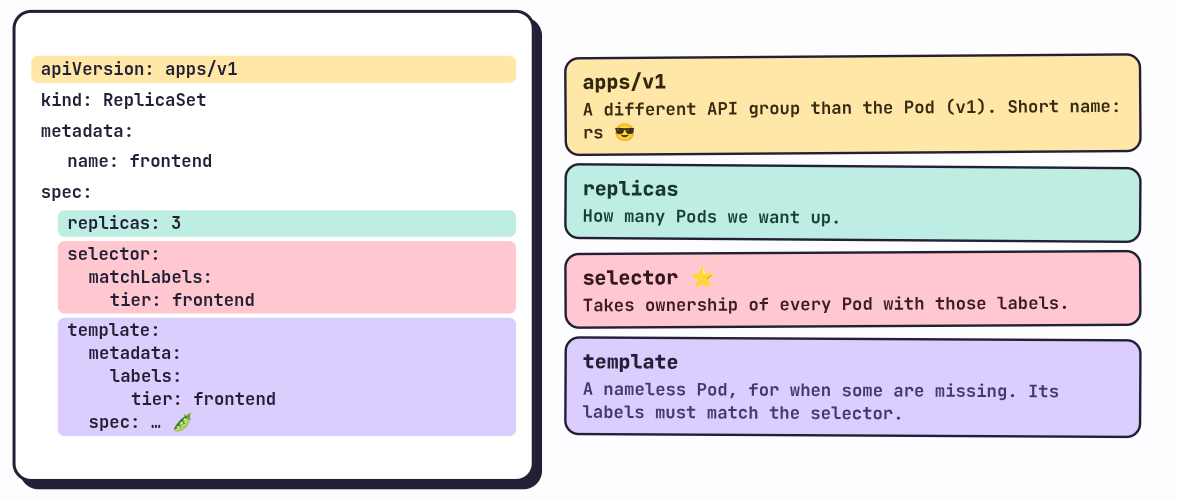
apiVersion: apps/v1
This is the first thing that catches our attention, because the Pod used v1 and here apps/v1 shows up. But why?
Because every K8s resource belongs to an API group, no, they’re not all the same, each one with its own version and its own role inside k8. To check it we can ask the cluster for the full list:
❯ kubectl api-resources
NAME                                SHORTNAMES   APIVERSION                        NAMESPACED   KIND
.
.
.
replicasets                         rs           apps/v1                           true         ReplicaSet
.
.
.
That’s the row we care about. We see two things: the ReplicaSet lives in apps/v1, and it also has a short name, rs, so in the terminal we can type rs instead of replicasets.
kind and metadata
The kind is ReplicaSet, the k8 resource. And metadata we already know what it’s for, it identifies us, nothing new tbh.
spec
Here there are three new fields:
- replicas: how many Pods of the service we want running. It’s the number of replicas we want to be up.
- selector: probably the most important part of the whole file. Under it is the
matchLabels, and that means the ReplicaSet is going to take ownership (ownership, we’ll see it in a moment) of all the Pods that have the labels defined there. Keep this idea in mind, because we’ll soon see its implications. - template: what the ReplicaSet will create when it’s missing Pods. It’s, no more and no less, the definition of a Pod tucked inside the ReplicaSet. A Pod without a name, because K8s gives it the name.
Let’s look at a detail that’s easy to overlook, the labels of the template have to match the selector. If not, the ReplicaSet would create Pods that it wouldn’t recognize as its own, and K8s flat out rejects that manifest.
Let’s try the ReplicaSet 🚀
Let’s apply the file:
❯ kubectl apply -f firstRs.yaml
replicaset.apps/frontend created
And we check that it’s running:
❯ kubectl get rs
NAME       DESIRED   CURRENT   READY   AGE
frontend   3         3         3       8m4s
Three desired, three current, three ready. All perfect! 🎉
Let’s look at the Pods. At the beginning:
❯ kubectl get pods
NAME             READY   STATUS              RESTARTS   AGE
frontend-8v9ws   0/1     ContainerCreating   0          7s
frontend-bjd7q   0/1     ContainerCreating   0          7s
frontend-p96mr   0/1     ContainerCreating   0          7s
And after a while:
❯ kubectl get pods
NAME             READY   STATUS    RESTARTS   AGE
frontend-8v9ws   1/1     Running   0          59s
frontend-bjd7q   1/1     Running   0          59s
frontend-p96mr   1/1     Running   0          59s
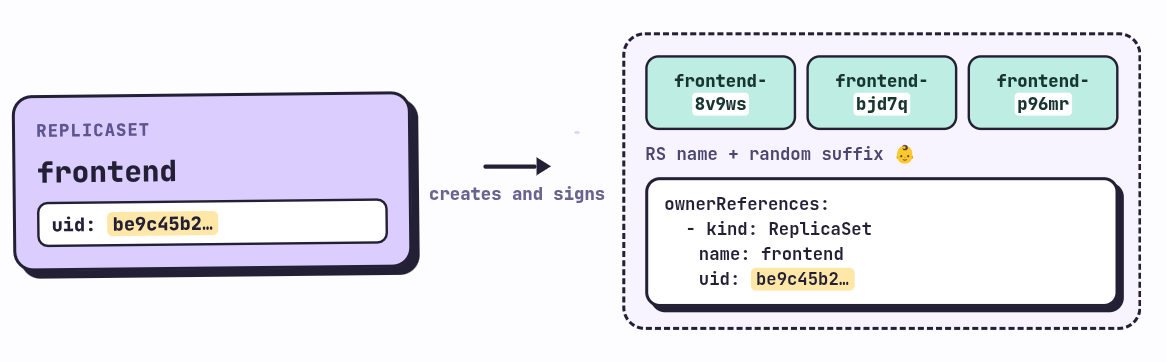
Look at the names. The Pods created by a ReplicaSet carry the name of the ReplicaSet followed by a random suffix that K8s assigns to them. We are no longer the ones naming them 👶
Ownership: who owns whom 🔗
Let’s step into one of those Pods to see what it has inside:
❯ kubectl get pod frontend-8v9ws -o yaml
apiVersion: v1
kind: Pod
metadata:
  creationTimestamp: "2026-10-08T22:05:39Z"
  generateName: frontend-
  generation: 1
  labels:
    tier: frontend
  name: frontend-8v9ws
  namespace: default
  ownerReferences:
  - apiVersion: apps/v1
    blockOwnerDeletion: true
    controller: true
    kind: ReplicaSet
    name: frontend
    uid: be9c45b2-110c-477d-ad08-4e372b028d5a
  resourceVersion: "225730"
  uid: d25ffbc2-a174-4b65-a0f4-9dcd734af5b6
spec:
  containers:
  - image: us-docker.pkg.dev/google-samples/containers/gke/gb-frontend:v5
    imagePullPolicy: IfNotPresent
    name: php-redis
...
The output is long, but what matters to us is the ownerReferences field. It’s an attribute that the ReplicaSet adds to the Pod when creating it, and it’s basically a description of who its owner is. Inside there’s a uid, the unique identifier of the ReplicaSet the Pod belongs to.
How do we check that it’s the same one? By asking the ReplicaSet for its YAML:
❯ kubectl get rs -o yaml
apiVersion: v1
items:
- apiVersion: apps/v1
  kind: ReplicaSet
  metadata:
    annotations:
      kubectl.kubernetes.io/last-applied-configuration: |
        {"apiVersion":"apps/v1","kind":"ReplicaSet", ... }
    creationTimestamp: "2026-10-08T22:05:39Z"
    generation: 1
    labels:
      app: guestbook
      tier: frontend
    name: frontend
    namespace: default
    resourceVersion: "225745"
    uid: be9c45b2-110c-477d-ad08-4e372b028d5a
Same uid (be9c45b2...). That’s called ownership, and it’s the way a ReplicaSet claims a Pod as its own 🏴☠️, yes, it’s that simple.
Does it really work? Let’s kill a Pod 🔫
So far we’ve only seen them being created. Let’s test the important part, that they stay. We delete one:
❯ kubectl get pods
NAME             READY   STATUS    RESTARTS   AGE
frontend-8v9ws   1/1     Running   0          14m
frontend-bjd7q   1/1     Running   0          14m
frontend-p96mr   1/1     Running   0          14m

❯ kubectl delete pods frontend-8v9ws
pod "frontend-8v9ws" deleted from default namespace

❯ kubectl get pods
NAME             READY   STATUS    RESTARTS   AGE
frontend-6srrv   1/1     Running   0          8s
frontend-bjd7q   1/1     Running   0          15m
frontend-p96mr   1/1     Running   0          15m
See that? We deleted frontend-8v9ws and within seconds there’s already a frontend-6srrv, 8 seconds old, taking its place. That’s the ir y venir (coming and going) from the song: Pods come and go, but the number stays where we asked for it 🔁 always, de es
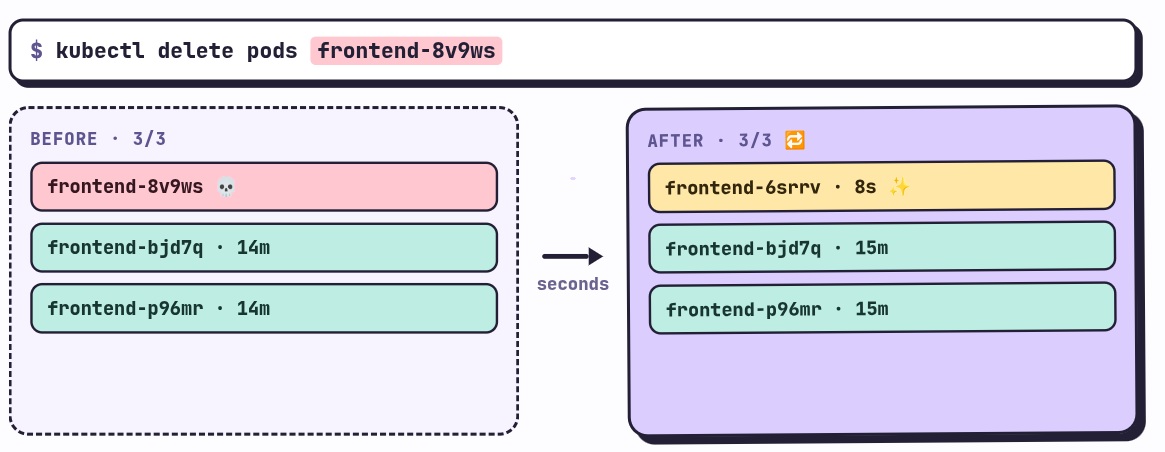
This is what a ReplicaSet does, make sure the desired number of replicas always exists. The Pod that died didn’t come back, it died for real, what appeared is a new one with another name and another identity. Hold on to this, because it shows up again further down.
The danger of bare Pods 😈
If we remember, at the beginning we said that the ReplicaSet is only in charge of making sure there’s an exact number of Pods that match the selector’s labels. Let’s see what implications that has with an experiment.
First we delete the previous ReplicaSet:
❯ kubectl delete -f firstRs.yamlNow we create a Pod on our own, by hand, with an nginx image, and we add a label on the fly in the terminal:
❯ kubectl run nginx-pod --image=nginx:1.14.2
pod/nginx-pod created

❯ kubectl label pod nginx-pod app=frontend
pod/nginx-pod labeled

❯ kubectl get pod nginx-pod -o yaml
apiVersion: v1
kind: Pod
metadata:
  creationTimestamp: "2026-10-08T22:32:32Z"
  generation: 1
  labels:
    app: frontend
    run: nginx-pod
The Pod now has the label app: frontend. A Pod created like this, with nobody managing it, K8s calls a bare Pod (a naked Pod, with no controller on top 🫣).
Now we create this ReplicaSet, secondRs.yaml:
apiVersion: apps/v1
kind: ReplicaSet
metadata:
  name: frontend-python-rs
  labels:
    app: frontend
spec:
  replicas: 5 # Number of pods to be created
  selector:   # Match the labels of the pods to be managed by this ReplicaSet
    matchLabels:
      app: frontend
  template: # The pod template used by this ReplicaSet if it needs to create new pods
    metadata:
      labels:
        app: frontend
    spec:
      containers:
        - name: pythonserverone
          image: python:3.12-alpine3.24
          command: ['sh', '-c', 'echo cont1 > index.html && python -m http.server 8081']
        - name: pythonservertwo
          image: python:3.12-alpine3.24
          command: ['sh', '-c', 'echo cont2 > index.html && python -m http.server 8082']
We ask for 5 replicas, and in the spec we define a template with 2 containers, each one running its python image (the example from the last post). We’d think the ReplicaSet would create 5 versions of this pod, right? Let’s see what happens for ourselves:
❯ kubectl apply -f secondRs.yaml
replicaset.apps/frontend-python-rs created

❯ kubectl get rs
NAME                 DESIRED   CURRENT   READY   AGE
frontend-python-rs   5         5         5       2m7s

❯ kubectl get pods
NAME                       READY   STATUS    RESTARTS   AGE
frontend-python-rs-b7bk5   2/2     Running   0          2m12s
frontend-python-rs-cmst6   2/2     Running   0          2m12s
frontend-python-rs-khfmk   2/2     Running   0          2m12s
frontend-python-rs-wx7wk   2/2     Running   0          2m12s
nginx-pod                  1/1     Running   0          16m
Interesting, right? We asked for 5 and the ReplicaSet says it has 5 (CURRENT 5), but it only created 4 Pods with our template. Look at the fifth one, nginx-pod, which isn’t even a Python one, it’s the nginx we created by hand.
What happened? When it was born, the ReplicaSet went out looking for Pods that already existed with the label app: frontend, found nginx-pod, and adopted it. Since it already had 1 of the 5, it only needed to create 4.
Let’s check it with the uid:
❯ kubectl get rs frontend-python-rs -o yaml | grep uid
  uid: 6de80a2b-5495-4532-bea3-92fc6fd8bb1a

❯ kubectl get pod nginx-pod -o yaml
apiVersion: v1
kind: Pod
metadata:
  creationTimestamp: "2026-10-08T22:32:32Z"
  generation: 1
  labels:
    app: frontend
    run: nginx-pod
  name: nginx-pod
  namespace: default
  ownerReferences:
  - apiVersion: apps/v1
    blockOwnerDeletion: true
    controller: true
    kind: ReplicaSet
    name: frontend-python-rs
    uid: 6de80a2b-5495-4532-bea3-92fc6fd8bb1a
  resourceVersion: "227752"
Same uid, the nginx-pod now has an owner and it’s the Python ReplicaSet. A Pod that was never part of the plan ended up counting as a replica, and now we have a Python ReplicaSet with an nginx infiltrated 🕵️
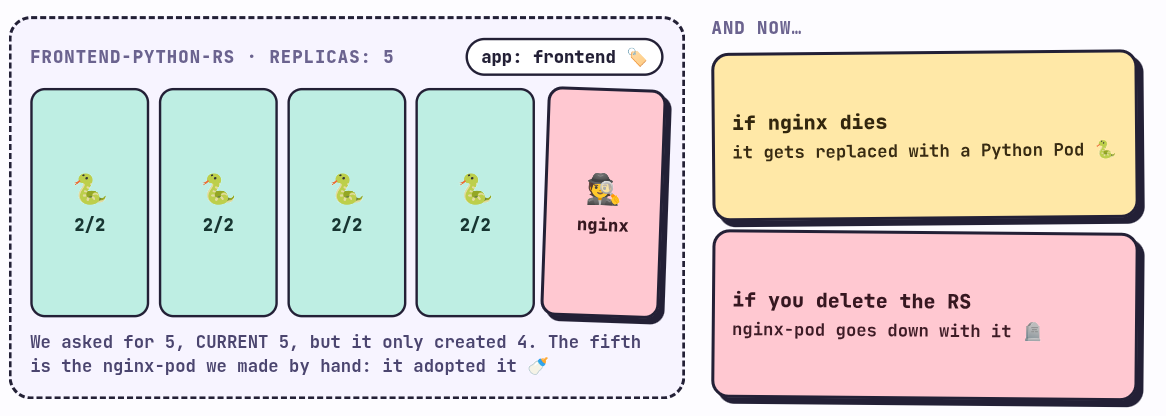
See how dangerous a bare pod is, if that nginx-pod dies, the ReplicaSet is going to replace it with a Python Pod, not with an nginx. And if you delete the ReplicaSet, the nginx-pod goes with it.
That’s why we shouldn’t create Pods on our own when there are controllers in play, or as a general rule. This is the dar y tener (give and have) from the song, the ReplicaSet gives Pods, but it also keeps all the ones it can if the label matches. The lesson is that labels have to be chosen carefully, and that Pods should be managed by a higher level object, not by us by hand.
Idempotence ♻️
Before closing I want to show two things. The first is idempotence. If we apply the same file again:
❯ kubectl apply -f secondRs.yaml
replicaset.apps/frontend-python-rs unchangedunchanged. K8s compares the desired state with the current one, sees that they are the same and does nothing. That’s what being idempotent means: applying the same thing over and over always gives the same result. It’s one of the reasons manifests are so comfortable, you can run apply without fear 😌
Changing the template doesn’t change the Pods 🪤
Now another very important point to understand about the limits and the real responsibilities of a ReplicaSet, and this one is best understood with another example.
This is thirdRs.yaml:
apiVersion: apps/v1
kind: ReplicaSet
metadata:
  name: third-rs
  labels:
    type: balancer
spec:
  replicas: 3 # Number of pods to be created
  selector:   # Match the labels of the pods to be managed by this ReplicaSet
    matchLabels:
      type: balancer
  template: # The pod template used by this ReplicaSet if it needs to create new pods
    metadata:
      labels:
        type: balancer
    spec:
      containers:
      - name: nginx-balancer
        image: nginx:1.14.2
We create it and check the image of one of its Pods:
❯ kubectl apply -f thirdRs.yaml
replicaset.apps/third-rs created

❯ kubectl get pods
NAME             READY   STATUS    RESTARTS   AGE
third-rs-49qdl   1/1     Running   0          8s
third-rs-ms82p   1/1     Running   0          8s
third-rs-rvw2v   1/1     Running   0          8s

❯ kubectl get pod third-rs-49qdl -o yaml | grep image
  - image: nginx:1.14.2
    imagePullPolicy: IfNotPresent
    image: nginx:1.14.2
    imageID: docker-pullable://nginx@sha256:f7988fb6c02e0ce69257d9bd9cf37ae20a60f1df7563c3a2a6abe24160306b8d
Now imagine that for whatever reason we want to do a downgrade to nginx:1.14.1. We change the image in the YAML (image: nginx:1.14.1, everything else the same) and apply:
❯ kubectl apply -f thirdRs.yaml
replicaset.apps/third-rs configuredconfigured, the change was applied. Or was it? Let’s look at the Pods:
❯ kubectl get pods
NAME             READY   STATUS    RESTARTS   AGE
third-rs-49qdl   1/1     Running   0          3m21s
third-rs-ms82p   1/1     Running   0          3m21s
third-rs-rvw2v   1/1     Running   0          3m21s

❯ kubectl get pod third-rs-49qdl -o yaml | grep image
  - image: nginx:1.14.2
    imagePullPolicy: IfNotPresent
    image: nginx:1.14.2
    imageID: docker-pullable://nginx@sha256:f7988fb6c02e0ce69257d9bd9cf37ae20a60f1df7563c3a2a6abe24160306b8d
The same Pods, from 3 minutes ago, with the old image. The ReplicaSet saved the change in its template, but it does nothing to the Pods that already exist, because the only thing it cares about is the quantity. The template is only used when it has to create a new Pod.
We can check that by deleting one:
❯ kubectl delete pod third-rs-49qdl
pod "third-rs-49qdl" deleted from default namespace

❯ kubectl get pods
NAME             READY   STATUS    RESTARTS   AGE
third-rs-694l7   1/1     Running   0          11s
third-rs-ms82p   1/1     Running   0          4m34s
third-rs-rvw2v   1/1     Running   0          4m34s

❯ kubectl get pod third-rs-694l7 -o yaml | grep image
  - image: nginx:1.14.1
    imagePullPolicy: IfNotPresent
    image: nginx:1.14.1
    imageID: docker-pullable://nginx@sha256:32fdf92b4e986e109e4db0865758020cb0c3b70d6ba80d02fe87bad5cc3dc228
The new Pod (third-rs-694l7) was born with 1.14.1, and its two siblings are still on 1.14.2. For all of them to have the new version we’d have to delete them one by one (or all at once) and let the ReplicaSet put them back. It works, but doing it by hand in production is a headache, and having Pods of two versions living together is not exactly what we want 😵
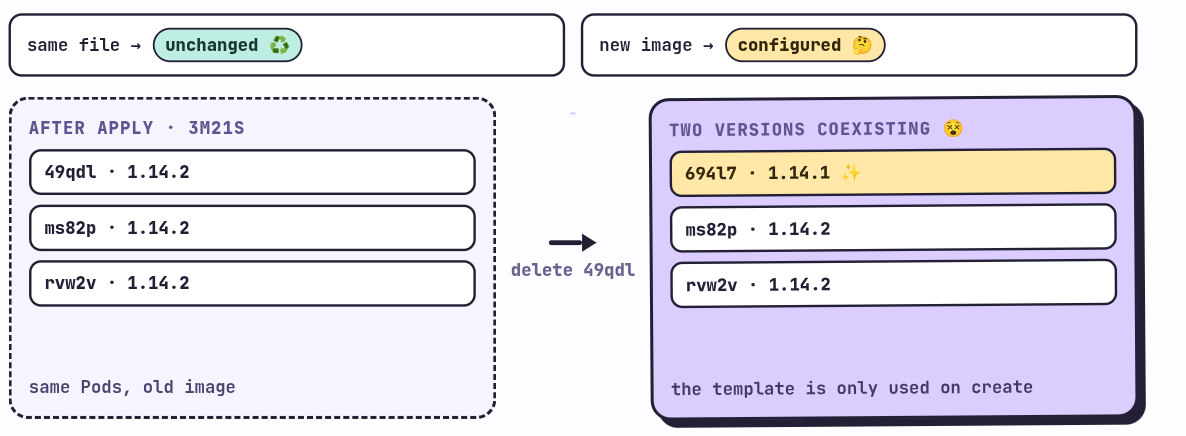
That’s why it’s so important to understand what a ReplicaSet does and, above all, what it does not do. It maintains the number of Pods, and that’s it. It doesn’t update, it doesn’t do rollouts, it doesn’t roll back.
What’s coming 👀
For that K8s has another resource, one level even higher than the ReplicaSet, that takes care of managing the ReplicaSets for us and doing the updates in an orderly way. It’s called Deployment, and it’s the topic of the next post.
That’s the seguir y guiar (follow and guide) part of the song: the ReplicaSet follows its Pods, and the Deployment guides the ReplicaSet 🧭
The song of the post
Nsqk releases an album seven days from this publication. He’s one of my favorite artists from Mexico for his sounds and for the experimentation with different genres he has done. I know his album ATP by heart, it’s really good.
But this time I want to recommend a cover, and it’s one of the few times I say the cover beats the original. It’s his version of Nunca estoy, from the album El Madrileño by C. Tangana, which he played in 2023 at his Roy concert in Monterrey. IT’S ONE OF THE BEST COVERS I’VE HEARD IN MY LIFE 🔥
No me has llamado.
Comments