
Hey, in the previous post I gave you a little preview of this topic, I told you I’d come back to Pods, and here we are. We saw the master, the nodes, and I said a Pod “can have one or more containers” without going too deep into it, because I think Pods deserve their own chapter, K8s is built strictly around managing and orchestrating Pods, so yeah, they earned it.
Okay, but first things first, we need to talk about containers (THEY ARE NOT THE SAME THING 😭, I THOUGHT THEY WERE 😭, BUT AS I DUG DEEPER INTO K8s I REALIZED THEY’RE NOT, THEY’RE DIFFERENT, YOU’LL SEE) before getting to the Pod we need to understand well what a container is, and for that, a bit of history.
Why containers and not VMs 🖥️
Let’s go back to the year 1600 🥸 back then, programming was pretty rustic, and it was done by hand, with perforated stone tablets so the engineers of that time…, no I’m kidding 😅, let’s get to reality.
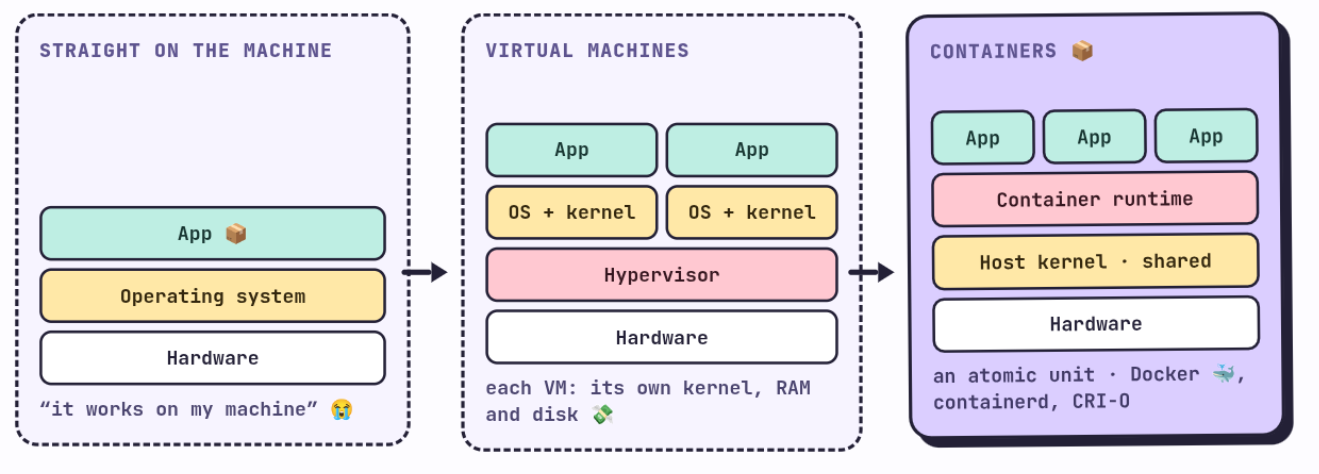
At the start of software development, code used to be deployed directly on a machine (servers, or even your PC), with no layer in between. The problem was incompatibility (when I started programming I suffered a lot with this, and the saying “it runs fine on my computer” was very common), so the software we developed ran perfectly on our PC but it was very likely to break on a coworker’s machine, or in production 😭, because of a thousand different details of operating system, libraries, versions, etc…
Then virtual machines showed up. The idea was simple, on the same physical hardware, run something called a hypervisor that takes care of splitting up resources and spinning up several complete machines, each with its own operating system. This partly fixed the compatibility issue, but it brought a new problem, a really big one, and it mainly comes down to the fact that each VM needs its own full kernel, its own reserved RAM, its own disk for the OS. Keeping that at scale is expensive and heavy 💸
And out of all that mess is where containers come in 📦. The idea behind containers was to swap the hypervisor for a container runtime, and instead of virtualizing full hardware, all the containers share the same host kernel using the least amount of resources possible. A container is an atomic unit (pay attention to that word please, for the whole post), you need to remember that. The best known runtime is Docker 🐳, but it’s not the only one, there’s also containerd, CRI-O, and others.
How a container actually works inside 🧩
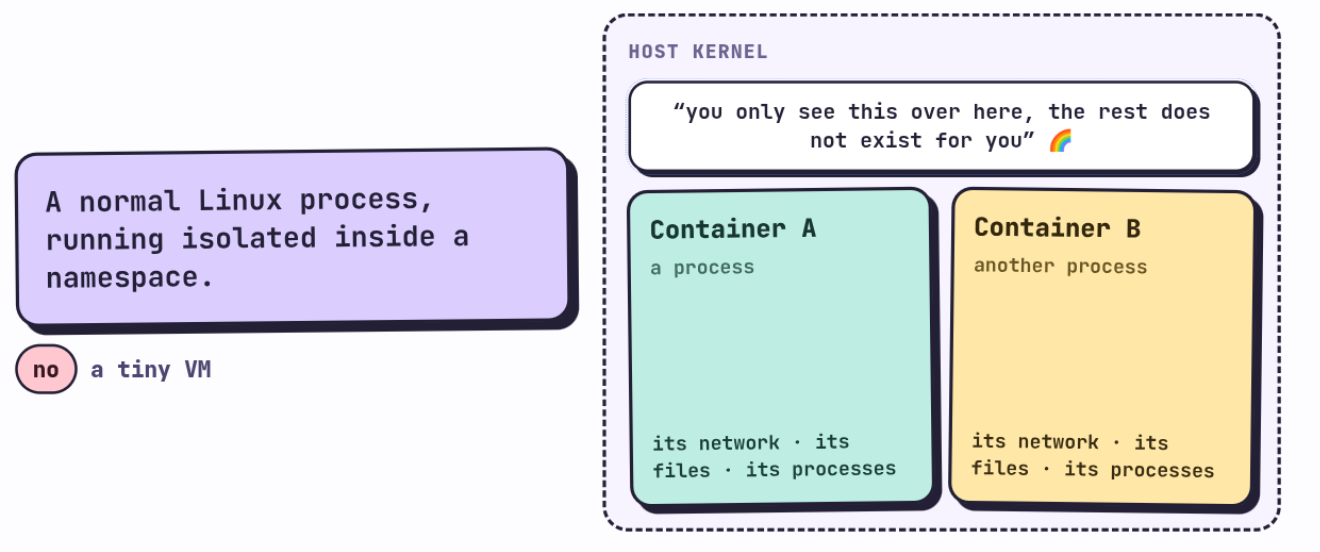
A container isn’t magic (although you could argue it is, debatable depending on who you ask) and it’s not a tiny VM either, watch out for this, a lot of people confuse a container with a VM and no, they’re two different things. A container is a normal Linux process, running isolated inside a namespace. And now we ask ourselves what a namespace is 😅, the first time I saw this concept it took me a while, the first time I studied K8s, I couldn’t quite understand what a namespace really was, and without that, nothing else makes sense.
Well, in my infinite wisdom, let me share a bit about what a namespace is. A namespace is, basically, a way the kernel has of telling a process “you can only see this over here, the rest doesn’t exist for you”, it’s a world that gets created so the container can live in its own reality 🌈. When the runtime creates a container, it either creates new namespaces, or inherits some from the parent process. There are several types, let’s break them down one by one.
IPC (Inter Process Communication) 💬
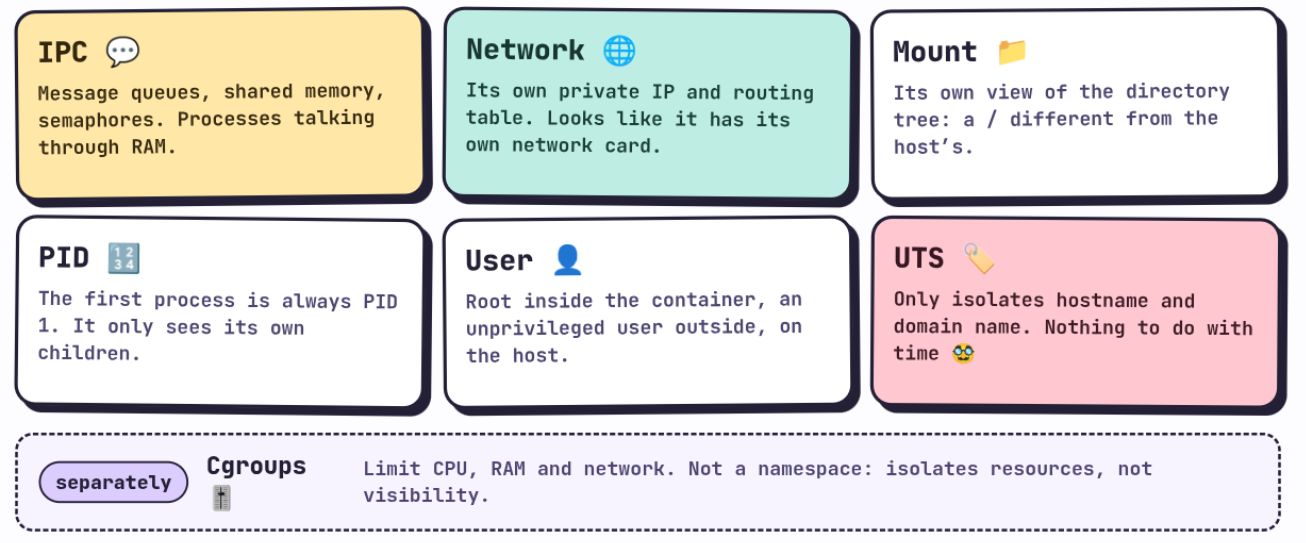
When you create two containers, each one has its own IPC, so they’re isolated from each other at the process level (the processes that Linux or the program runs, let’s think of it that simple way). IPC is the mechanism processes use to share information with each other (message queues, SysV-style shared memory, semaphores). It’s not today’s topic, which we’ll cover in K8s, but keep the idea in mind, since it’s for processes to talk to each other, usually through memory, and the best known way is communication through RAM.
Cgroups 🎚️
Cgroups are what assign and limit the container’s resources, CPU, cores, network, RAM. It’s what keeps a container from eating up all the node’s hardware. Heads up, technically a cgroup isn’t a namespace like the rest of this list (it’s a separate kernel mechanism), but it’s always mentioned alongside them because it fills the same isolation role, just for resources instead of visibility 🥸.
Network 🌐
Each container has its own private IP, its own routing table, and only sees the hosts or services on that network. From the outside, each container looks like it has its own full network card, even though underneath it’s all running on the same host kernel.
Mount 📁
Lets you mount external filesystems inside the container, and gives it its own view of the directory tree. That’s why a container can have a / completely different from the host’s, or from another container right next to it, even though both are running on the same physical machine.
PID 🔢
This is the process namespace. Inside its own PID namespace, a container’s first process is always PID 1, and it only sees its own child processes, nothing else from the rest of the system.
User 👤
This is the users one. It lets a process be root inside the container, but an unprivileged user outside, on the host. This massively reduces the possible damage if someone manages to escape the container.
UTS 🏷️
And no, UTS has nothing to do with time, even though the name suspiciously looks like UTC 🥸 and it almost confused me the first time too. UTS 🥸 is short for “UNIX Timesharing System”, an old and pretty weird name, and the only thing it isolates is the container’s hostname and domain name. Each container can have its own hostname, without stepping on the real host’s or another container’s. Yeah, its name doesn’t help 🥸.
From LXC to Docker 🐳
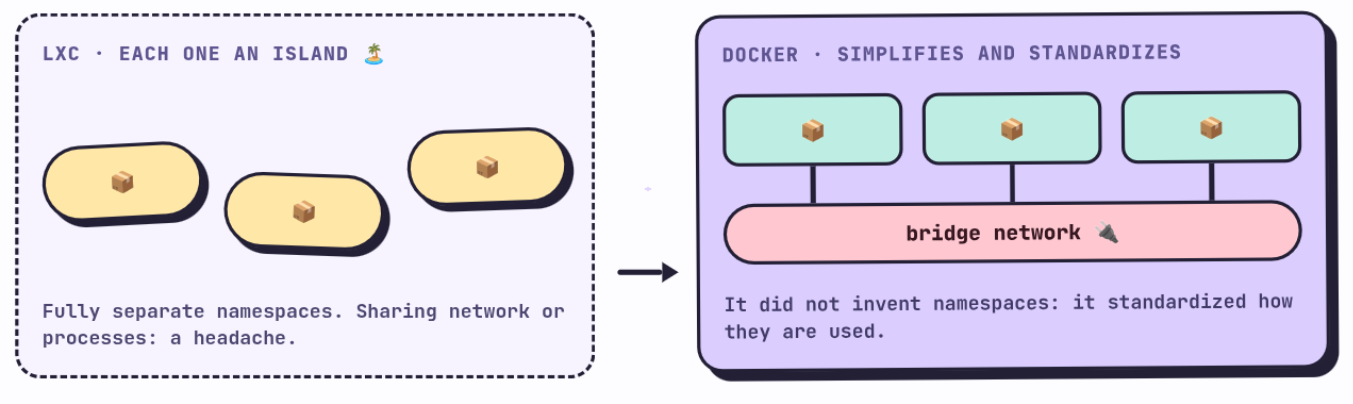
A quick history fact, in 1556, during the first operating systems war, long before Docker there was LXC, and with LXC each container was its own island 🏝️, with all its namespaces completely separate from any other. The problem was that sharing processes, network, or anything else between two containers was a headache.
So Docker didn’t invent namespaces (those already existed in the Linux kernel), what it did was simplify and standardize how they’re used. For example, on the networking side, it created a bridge type network so containers on the same host could see each other without you having to wire everything by hand. That’s part of why the community took to it and adopted it so fast, of course it did a lot more than that, but that’s one of the things.
So now, what is a Pod, really? 🫛
A Pod is, basically, sharing certain namespaces between several containers. But careful, not all of them are shared, only three, IPC, Network, and UTS.
When K8s creates a Pod, underneath it first creates an “invisible” container, often called the pause or infra container. This container doesn’t do anything, literally its only job is to fall asleep 😴 and keep those three namespaces open. Then, each real container you defined in the Pod joins those same namespaces instead of creating its own.
That’s why, inside the same Pod:
The containers inherit the same network namespace 🔌, so they share the same IP, and they can talk to each other via localhost, over TCP or UDP, as if they were two processes on the same machine (and in fact, to the kernel, they are!). Watch out for this, if two containers in the same Pod try to use the same port, they collide, because they share the same network stack.
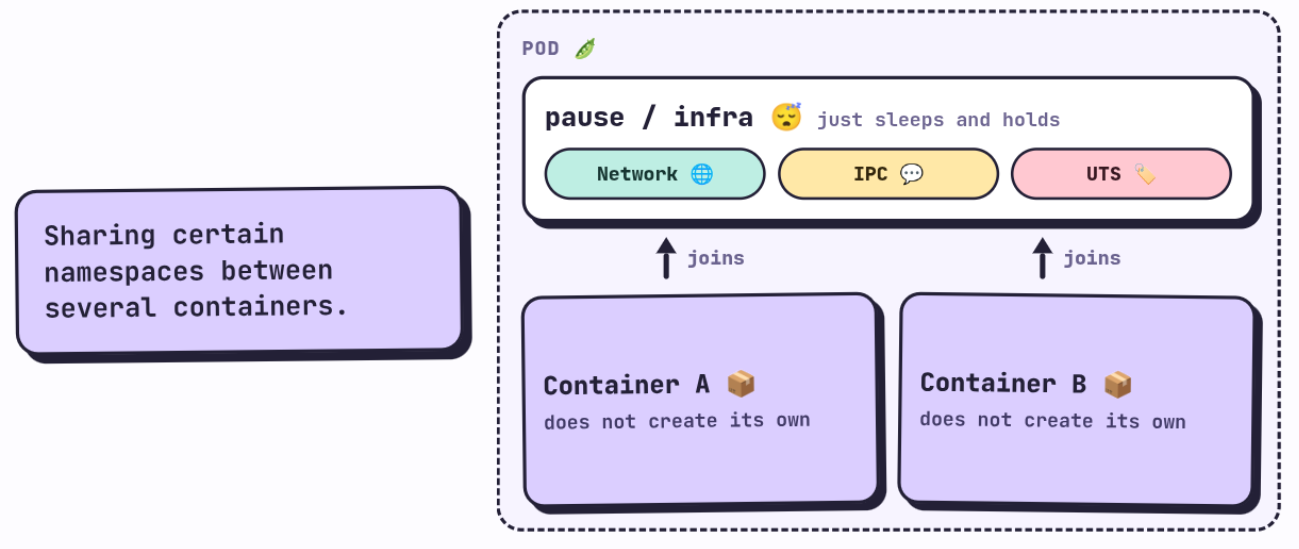
They also share IPC 💬, so if they wanted to, they could communicate with each other directly through shared memory, without going through the network. In practice almost nobody uses this directly, but it’s there available.
And they share UTS 🏷️, so they see the same hostname.
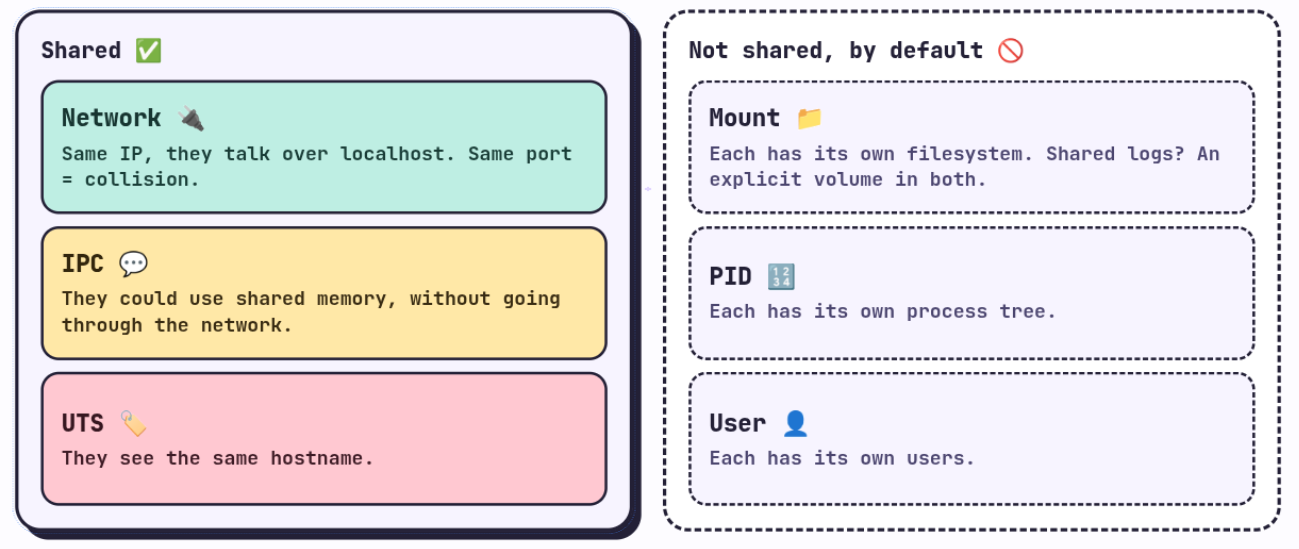
What a Pod does not share by default is the Mount, the PID, and the User. Each container still has its own filesystem and its own process tree, isolated from the rest. That’s why, when I talked about the sidecar pattern in the previous post, the main container and the support one don’t magically see each other’s files, if you need them to share something from the filesystem (for example, logs) we have to mount an explicit volume in both of them, ourselves, we’ll get to that later. Sharing network and IPC for free, sure, but the disk you have to ask for on purpose.
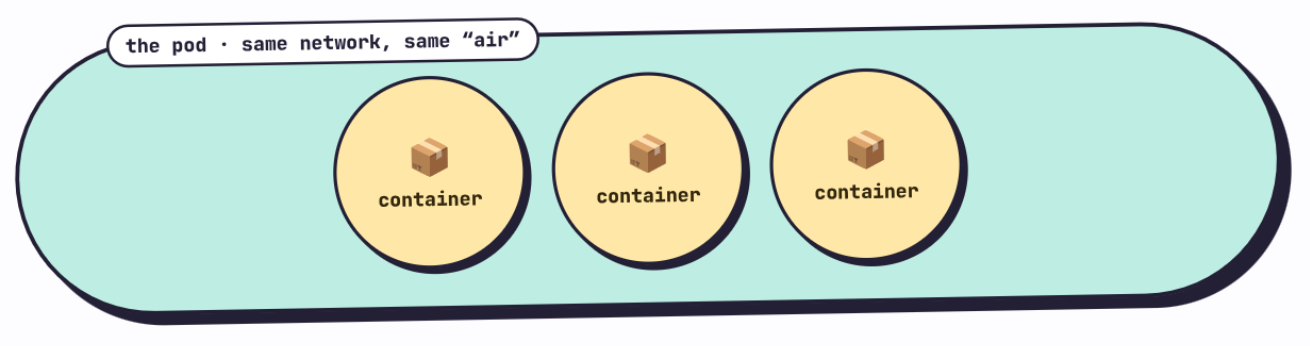
Now that you read what a container is and know what a Pod is you can understand why it’s called Pod, the name Pod in English is literally the pea pod, that capsule that wraps several peas together. Each pea (container) is still its own thing inside, but they all travel enclosed in the same pod, sharing the same network space, the same “air” of that capsule. The 🫛 emoji from the previous post wasn’t a coincidence.
In the next post we’re jumping straight into K8s, I know these first two posts were very theoretical, but trust me they’re pretty necessary for everything we’ll do from here on.
The song of the post
Louise by TV Girl.
Louise. You can’t be anybody’s friend